How to Use DivTrackr's Explore Feature to Evaluate Any Dividend Stock in 1 Minute

When I first started investing, researching a single stock took hours.
I'd open the annual report, dig through the income statement, pull up the balance sheet, cross-reference with other sites for the dividend history — and by the time I had a rough picture, I'd already spent an entire afternoon on one counter. Then I'd have to repeat the whole thing for every other stock in the same sector I was comparing it against.
The honest truth is: most of that time wasn't value-added research. It was just data collection. Hunting for numbers that should have been in one place.
That's what DivTrackr's Explore feature is designed to fix.
In under a minute, you can pull up any Bursa Malaysia stock and get a clear, structured snapshot of the metrics that actually matter for dividend investing — without opening a single annual report.
Here's how to use it.
Step 1: Tap the Explore Tab
Open DivTrackr and look at the bottom navigation bar. You'll see four tabs: Home, Explore, Portfolio, and Profile.
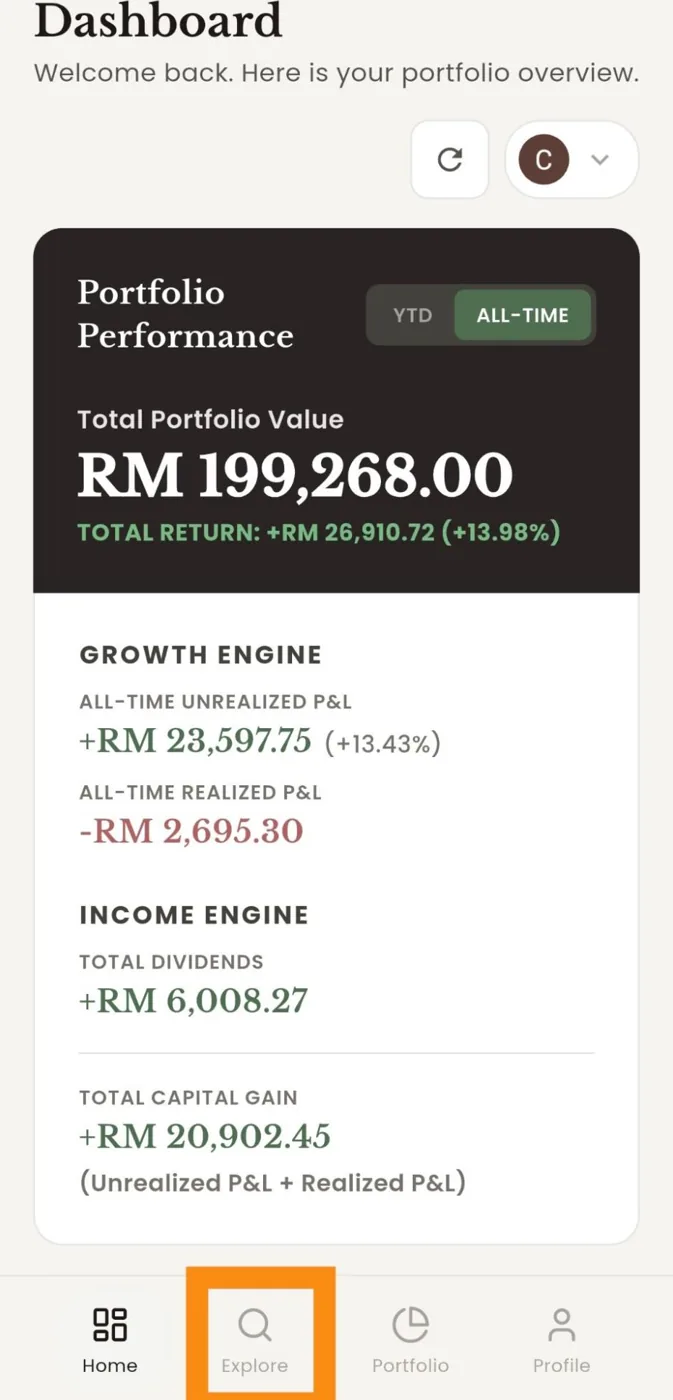
Tap Explore.
You'll land on a search screen that already shows a list of Popular Stocks — these are the most-searched counters among DivTrackr users, including names like MAYBANK, CIMB, SUNREIT, PAVREIT, KIPREIT, TENAGA, CLMT, and MRDIY. If you're researching one of these, just tap directly from the list.
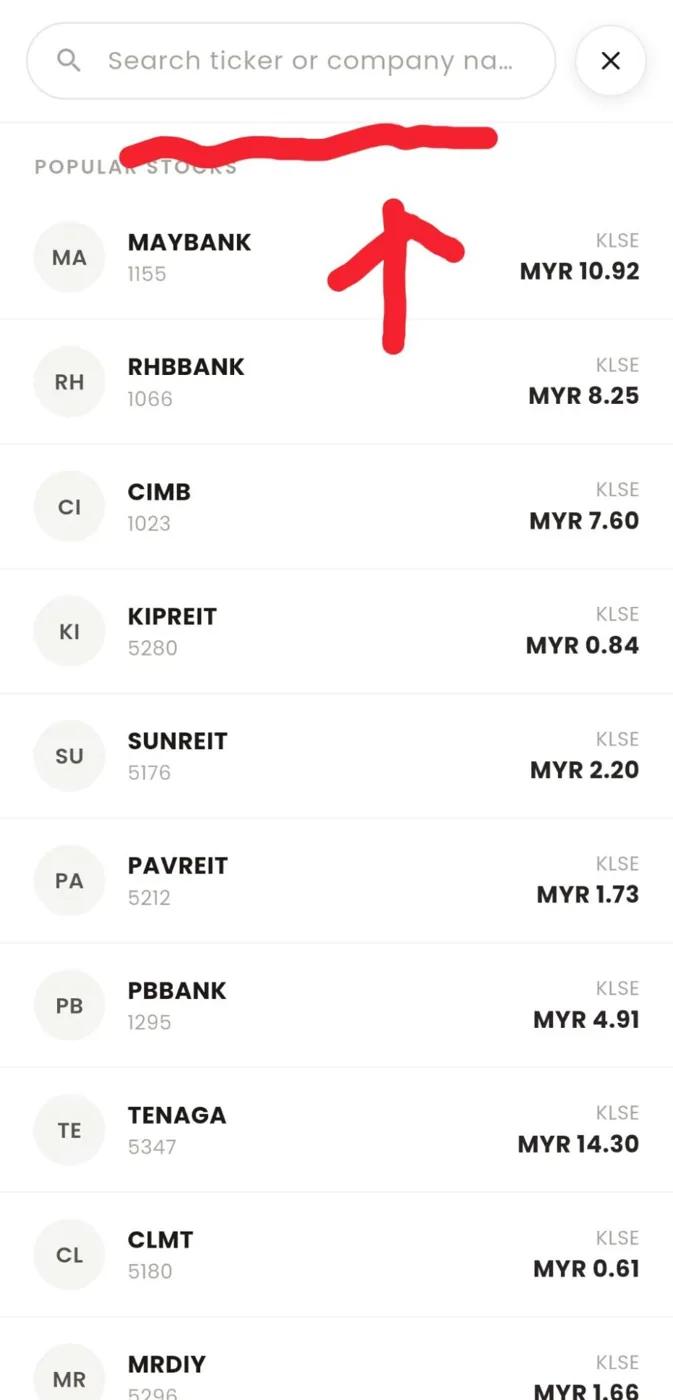
Otherwise, tap the search bar at the top and type in either the stock ticker (e.g. 5296) or the company name (e.g. "Mr DIY"). DivTrackr will surface the matching result.
Step 2: Read the Stock Info Card — Financial Health at a Glance
The first thing you'll see is the Stock Info card. This gives you the core financials from the company's most recent balance sheet:
- Current Price — the latest market price
- Market Cap — total company value at current price
- Enterprise Value — market cap plus net debt (a more complete picture of what the company is worth)
- Shares Outstanding
- Total Cash
- Total Debt
- Net Cash / Debt — the single most important number on this card
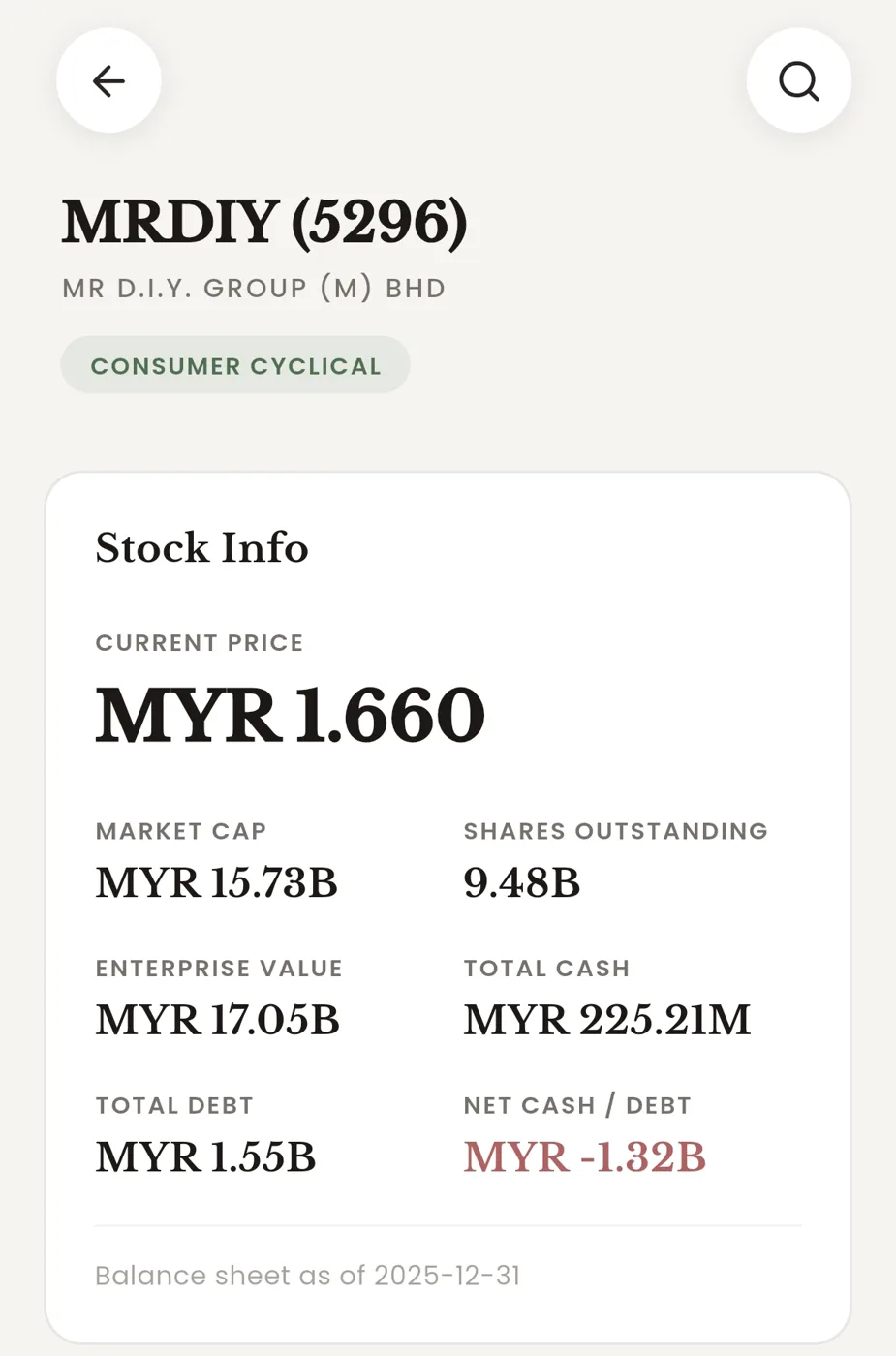
That last figure — Net Cash / Debt — tells you immediately whether the company is in a financially healthy position or carrying a debt burden that could threaten future dividends. A positive number means the company holds more cash than it owes. A negative number (shown in red) means it's in net debt.
For dividend investors, this is the first filter. A company drowning in debt is unlikely to sustain — or grow — its dividend payout. That said, some business models are naturally capital-intensive — REITs, utilities, and telcos routinely carry net debt as part of how they operate, and that doesn't automatically make them uninvestable. What you're really watching for is whether the debt level is manageable relative to the company's earnings and cash flow. Net debt is a flag to investigate further, not always a reason to walk away.
Example: When looking at MRDIY (5296), you'd see Net Debt of MYR -1.32B. That's something worth noting before you go any further.
Step 3: Check the Price Chart
Scroll down slightly and you'll find the Price Chart, powered by TradingView. You can toggle between time periods: 1M, 3M, 6M, YTD, 1Y, 2Y, 5Y.
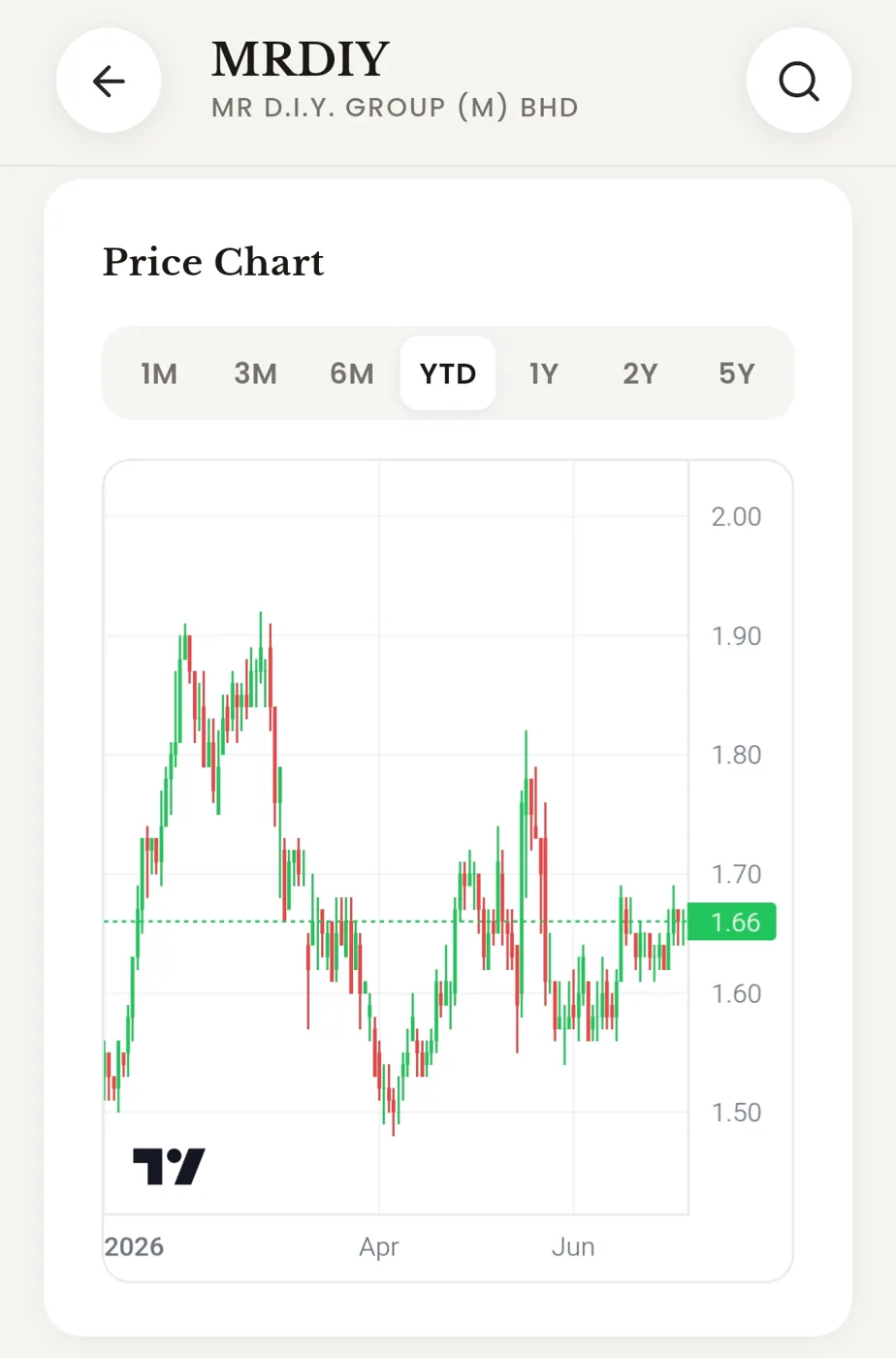
This isn't about trying to time the market. It's about getting a quick read on how the stock has been trading — whether there's been a recent selloff that might represent an opportunity, whether price has been trending down over years (a warning sign), or whether it's near a historical high.
For dividend investors, the chart also gives you a sense of what your yield-on-cost could look like at different entry prices.
Step 4: The Dividend Info Section — The Numbers That Matter Most
This is the heart of the Explore feature for dividend investors.
The Dividend Info section shows you three things:
Dividend Yield — expressed as a percentage, calculated on a trailing 12-month basis at the current price. This tells you what income you'd receive right now for every ringgit invested.
3Y Growth — the 3-Year CAGR (Compound Annual Growth Rate) of dividends. This is arguably more important than current yield. A stock yielding 4% today but growing dividends at 30% per year will yield far more on your cost in three years. A stock yielding 6% but with shrinking dividends is a trap.
Frequency — how often the company pays dividends (Quarterly, Semi-Annually, Annually). This matters for cash flow planning.
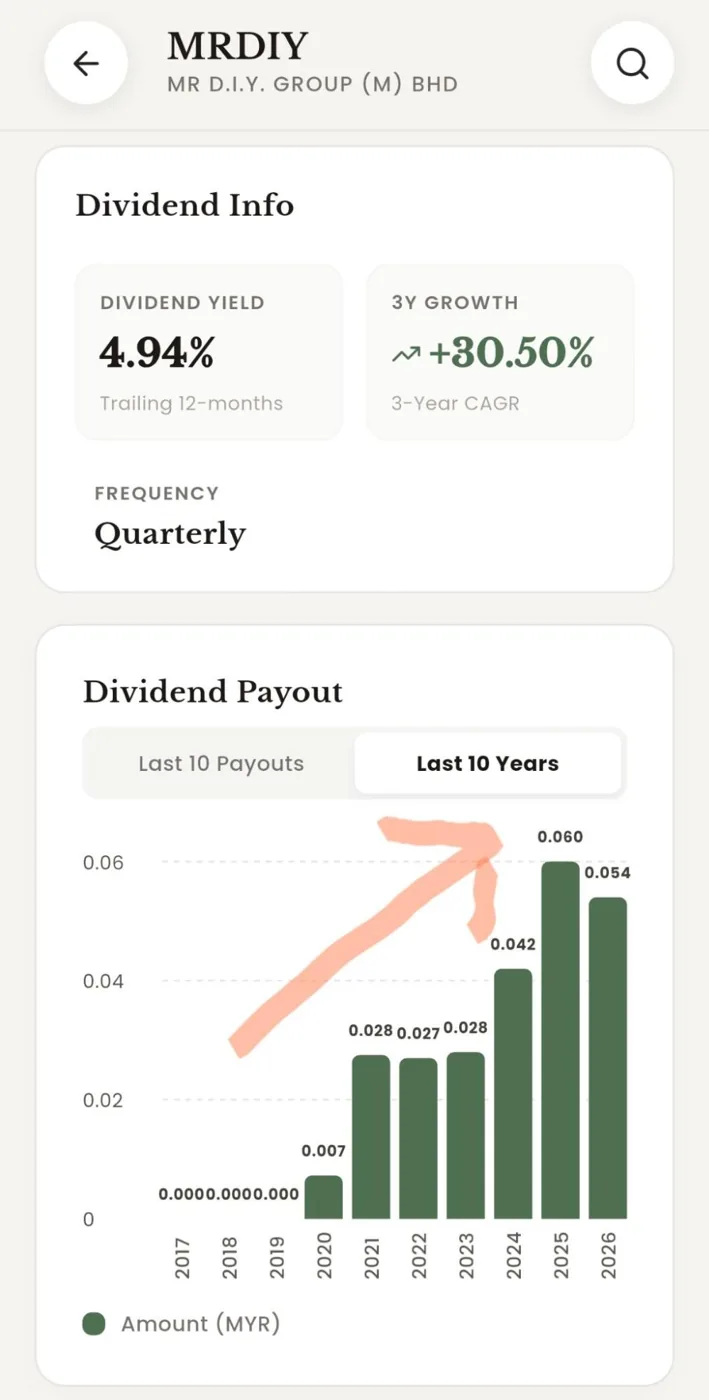
Below these summary figures, the Dividend Payout chart gives you the actual historical payout amounts — either the Last 10 Payouts or grouped by Last 10 Years. You can toggle between both views.
This chart is where you see the real story. Are dividends growing consistently, year after year? Have there been cuts? Has growth stalled? A rising bar chart over time is exactly what a dividend investor wants to see.
Example: MRDIY's Dividend Payout chart shows a clear upward staircase from RM 0.010 per quarter in early 2024 to RM 0.020 in April 2026 — a doubling in two years. That's the kind of trajectory dividend growth investors want to find.
Step 5: Revenue & Profit — Is the Business Growing?
Dividends don't appear from thin air. They come from profits. And profits come from a growing business.
The Revenue & Profit section shows you exactly that — an annual (or quarterly) bar chart of Revenue and Net Profit over the past several financial years.
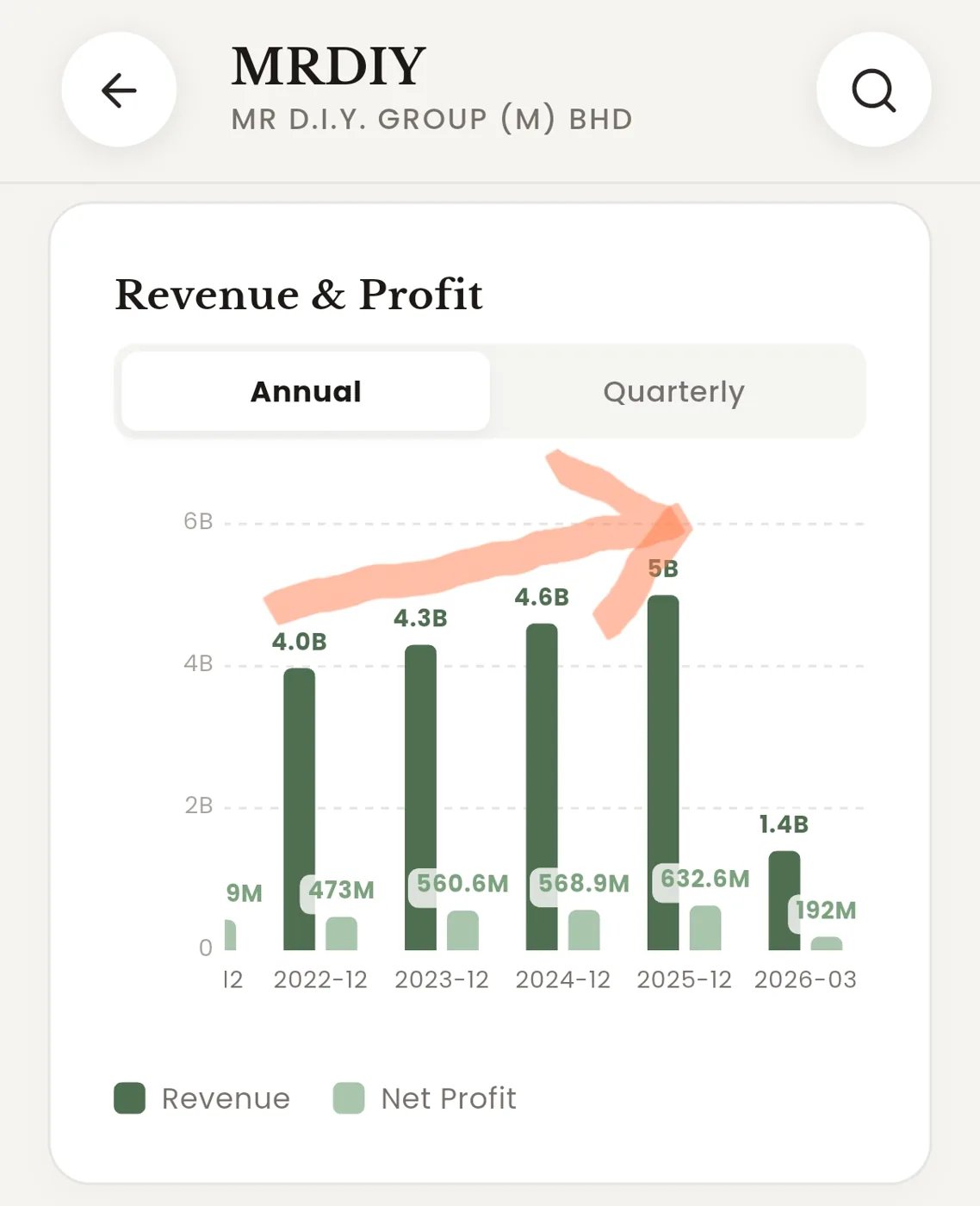
What you're looking for: both bars trending upward over time. Revenue growth tells you the business is expanding. Net Profit growth confirms that expansion is translating into real earnings — not just top-line scale.
A stock where revenue grows but profit shrinks is a company losing pricing power or spending more than it earns. That's a yellow flag.
A stock where both revenue and profit compound steadily upward is a business that can support growing dividends over time.
You can toggle between Annual and Quarterly views — Annual is best for spotting long-term trends, Quarterly is useful if you want to check whether recent results are holding up.
Step 6: Dividend Quality — Can the Company Actually Afford to Pay?
This is the section that most retail investors skip when doing their own research — partly because it requires pulling data from multiple places, and partly because it involves concepts (like Free Cash Flow) that feel technical.
DivTrackr does the work for you.
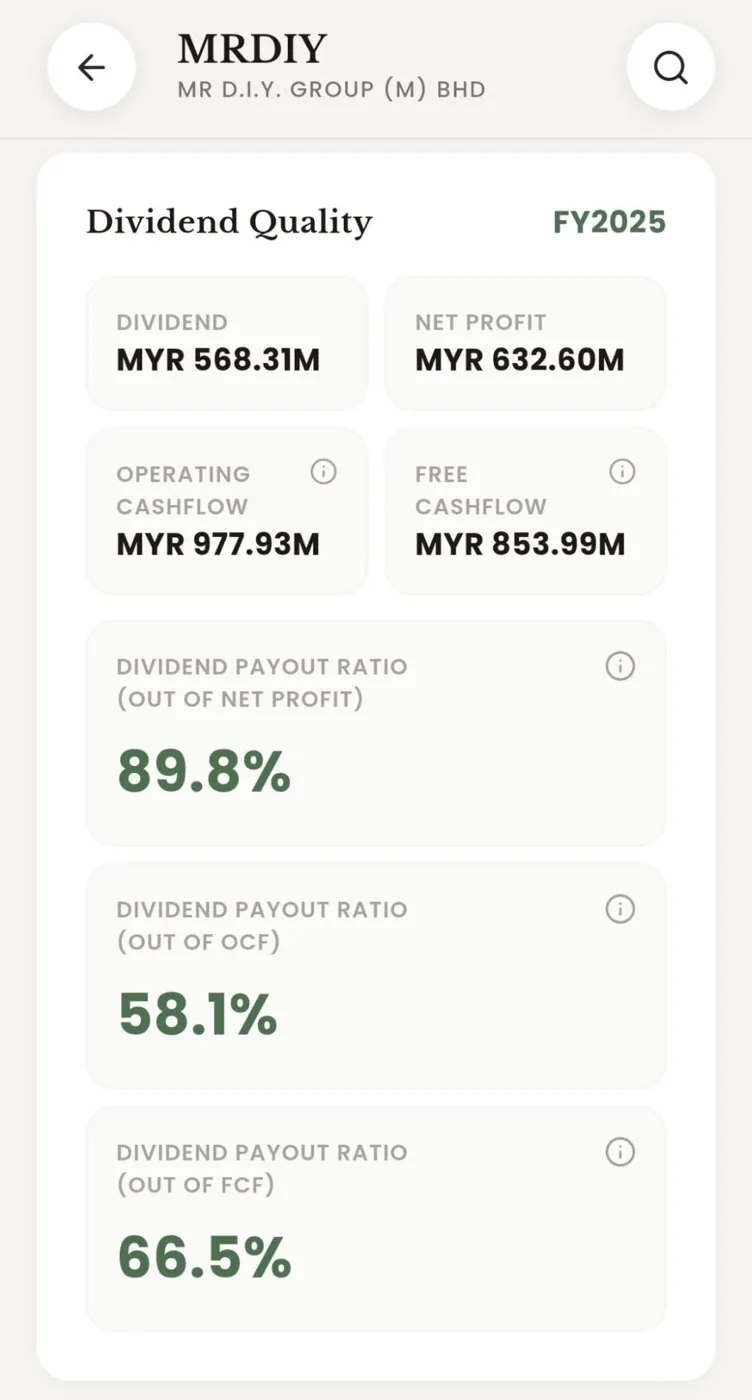
The Dividend Quality section shows you, for the most recent financial year:
- Total Dividends Paid (in RM)
- Net Profit (in RM)
- Operating Cash Flow (in RM)
- Free Cash Flow (in RM)
- Dividend Payout Ratio out of Net Profit — what percentage of reported earnings was paid out as dividends
- Dividend Payout Ratio out of Operating Cash Flow (OCF) — a more conservative measure, since OCF strips out accounting adjustments
- Dividend Payout Ratio out of Free Cash Flow (FCF) — the most stringent measure, after accounting for capital expenditure
Here's why this matters: a company can report a healthy net profit while actually burning cash. The FCF payout ratio is the hardest test. If a company is paying out more in dividends than it generates in free cash flow, the dividend is likely unsustainable.
In general:
- Payout ratio below 70% of FCF is considered healthy — and if it's very low (say, 30%), that's actually a positive signal. It means the company has significant room to grow its dividend without needing to grow the business at all. A high dividend yield combined with a low FCF payout ratio is one of the most attractive combinations a dividend investor can find.
- Payout ratio above 90% of FCF is a warning sign — any earnings miss could force a cut
- Payout ratio above 100% of FCF means the company is literally borrowing to pay dividends
Example: For MRDIY, the FCF payout ratio was 66.5% — comfortably within sustainable range. The Net Profit payout ratio was higher at 89.8%, but the fact that FCF payout remains below 70% suggests the dividend is well-covered at the cash level.
Step 7: Future Growth Catalyst & Risk (PRO)
At the bottom of the Explore page, you'll see the Future Growth Catalyst & Risk section — a PRO feature.
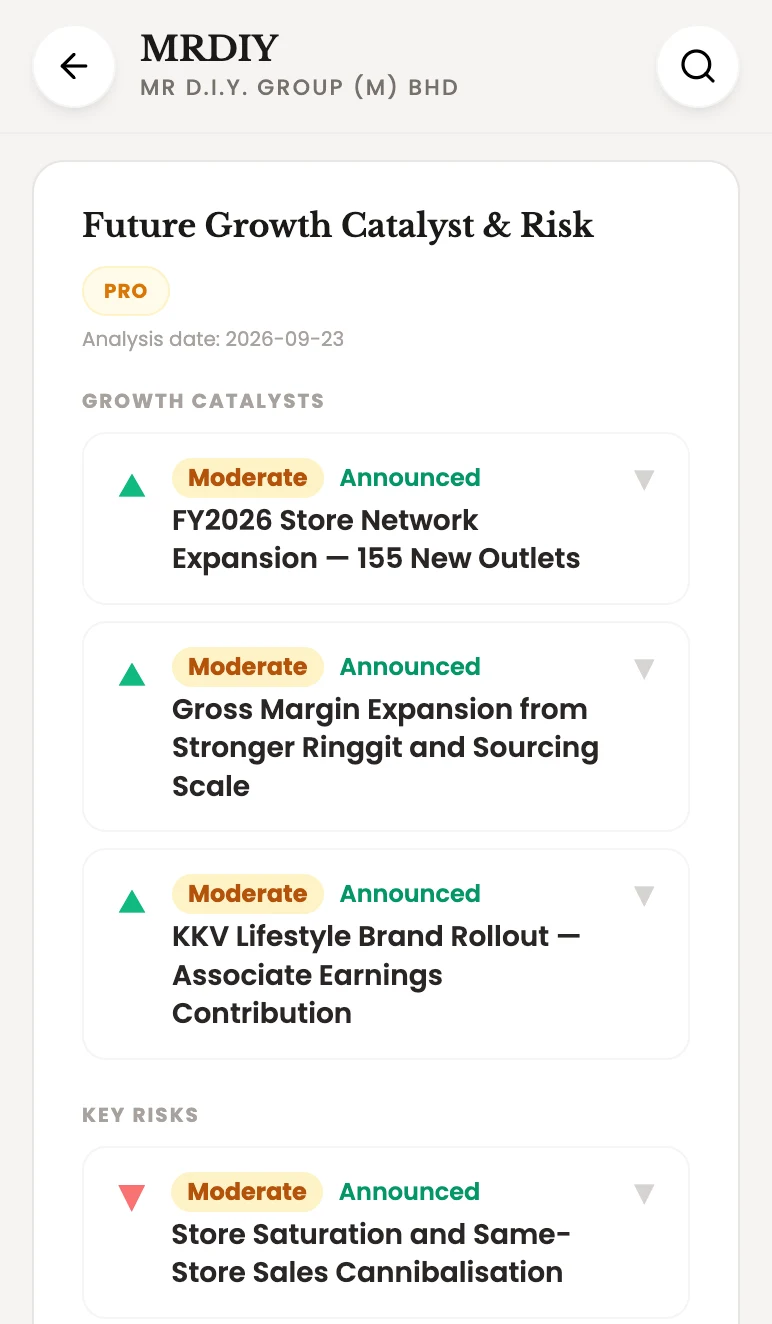
This section surfaces upcoming events that could meaningfully move a stock's earnings — capacity expansions, contract renewals, acquisitions — alongside risks that could weigh on future performance.
Think of it as the second layer of research. Once the free sections above tell you the current picture, the Catalyst & Risk section tells you where the stock is likely headed.
Step 8: Analyze with AI (PRO, Coming Soon)
Coming soon to PRO: Analyze the Stock with AI, a feature that will let you ask the AI specific questions about any stock:
- "Is this stock undervalued right now?" (Valuation)
- "Will the dividend be sustainable over the next 3 years?" (Dividend)
- "What are the biggest risks to watch?" (Risk)
- "How does management quality score?" (Management)
It will take the raw data you've reviewed above and let you interrogate it — getting answers tailored to your specific investment questions, not generic summaries.

What to Do After Explore
Explore is designed as a first filter, not a final verdict.
If a stock fails the basics — net debt too high, dividends shrinking, profits declining, payout ratio unsustainable — you can move on in under a minute. No hours lost.
If a stock passes — healthy balance sheet, growing dividends, rising earnings, sustainable payout ratio — then it deserves deeper research. That's when you pull out the annual report, read the management commentary, and think about your entry price.
Explore doesn't replace analysis. It just makes sure you're only doing deep analysis on stocks that are worth it.
That's the idea.
Try It Now — It Really Does Take 1 Minute
Think about what you just walked through: balance sheet health, price trend, dividend yield and growth rate, historical payout track record, revenue and profit trajectory, and dividend sustainability across three cash flow measures. That's a complete first-pass analysis of any dividend stock.
All of it, in a single scroll. In under a minute.
That's what experienced investors have always done intuitively — they know exactly which numbers to look at first, and they ignore everything else until those pass. DivTrackr's Explore feature just makes that same process available to every retail investor, without the hours of digging.
Pick a stock you've been curious about — or one you already own and want to double-check. Open DivTrackr, tap Explore, and see what the numbers say. You might be surprised how quickly a clear picture forms.
If you don't have DivTrackr yet, sign up free at divtrackr.com and try Explore on your first stock today.
Tip: add DivTrackr to your home screen and turn on push notifications so you never miss a dividend announcement.
Happy investing, Neo — Founder, DivTrackr 🌱
Frequently Asked Questions
What stocks can I search in DivTrackr Explore? Explore covers Bursa Malaysia-listed stocks and REITs. You can search by ticker code (e.g. 5176) or company name (e.g. SUNREIT).
Do I need a DivTrackr account to use Explore? You'll need to be signed in to DivTrackr to access Explore. Sign up free at divtrackr.com.
What does Net Cash / Debt mean in the Stock Info card? Net Cash / Debt = Total Cash minus Total Debt. A positive number means the company holds more cash than it owes (financially healthy). A negative number (shown in red) means the company is in net debt — it owes more than it holds in cash.
What's the difference between Dividend Yield and 3Y Growth? Dividend Yield tells you what income you'd earn at today's price. 3Y Growth (3-Year CAGR) tells you how fast the dividend has been growing. Both matter — a high yield on a flat or shrinking dividend is less attractive than a moderate yield on a fast-growing one.
What is Free Cash Flow payout ratio and why does it matter? Free Cash Flow (FCF) is the cash a company generates after spending on capital expenditure to maintain or grow its business. The FCF payout ratio tells you what percentage of that real cash is being paid out as dividends. It's the most conservative test of dividend sustainability — a ratio below 70% is generally considered healthy.
What is the Future Growth Catalyst & Risk section? This is a PRO feature that uses AI to surface upcoming events that could meaningfully impact a stock's earnings — such as capacity expansions, contract renewals, or acquisitions — alongside risks that may weigh on future performance.
Can I compare multiple stocks in Explore? Currently, Explore shows one stock at a time. To compare stocks, you can use the search icon at the top right of any Explore page to switch to another counter quickly.